Maths program test download 2
(Here is the main program to download – no zipping, files not in exes, uploading whole folder. Updated to be sure.)
Thanks for purchasing Gilead® Success with Maths. Click on the following link to download the program.
Then click on DOWNLOAD ALL. OR right click on the folder, “Gilead Success with Maths digital download”, and choose “Download”. This may take a few minutes.

If a sign “leave” appears, click it. You will eventually find the file in your downloads folder. Right click on it and choose “Extract here”. This will make a folder, “Gilead Success with Maths 800×600 publish”, in downloads. Move this to a convenient place. Open the folder, then double click on Start_SuccesswithMaths.exe to run it, or make a shortcut to your desktop.
Here are some of the programs in the subfolders. If any of these programs don’t work properly via the main program, try downloading the individual programs below and replacing them in the appropriate folder.
In the program for younger children:
In the main program:
7. Squares, cubes, square roots … (SquaresCubesRoots.exe)
12. Algebra (Algebra.exe)
14. Trigonometry / Pythagoras (Trigonmetry.exe)
If you have a problem with any of the other programs, please contact me and I’ll add them to this list.
Hi Tim,
I suspect Algebra etc. above still won’t work. Here are 2 more to try, just by themselves. Don’t try to put them into the main program.
Test Algebra 1 Wave files are in a separate folder.
Test Algebra 2 Wave files are in the same folder as the executable.
Trigonometry Wave files are in a separate folder.
SuccessMaths Trying all of the programs for older students shared at once in same folder.
This may take some considerable time
Check Place Value again:
____________________________________________________________________
Click on Gilead Success with Maths digital download (> download > leave > extract)
Then click on DOWNLOAD ALL. OR right click on the folder, “Gilead Success with Maths digital download”, and choose “Download”. This may take a few minutes.
If a sign “leave” appears, click it. You will eventually find the file in your downloads folder. Right click on it and choose “Extract here” or “Unzip to here“. This will make a folder, “Gilead Success with Maths digital download”, in your downloads folder. Move this to a convenient place. Open the folder, then double click on 00_Start_SuccesswithMaths.exe or make a shortcut to your desk top.
Troubleshoot: If any files appear to be missing, they will probably still actually be in your Google Drive folder. Look for them in the main folder or one of the subfolders, extract them and put them in the appropriate place where you have the program stored.
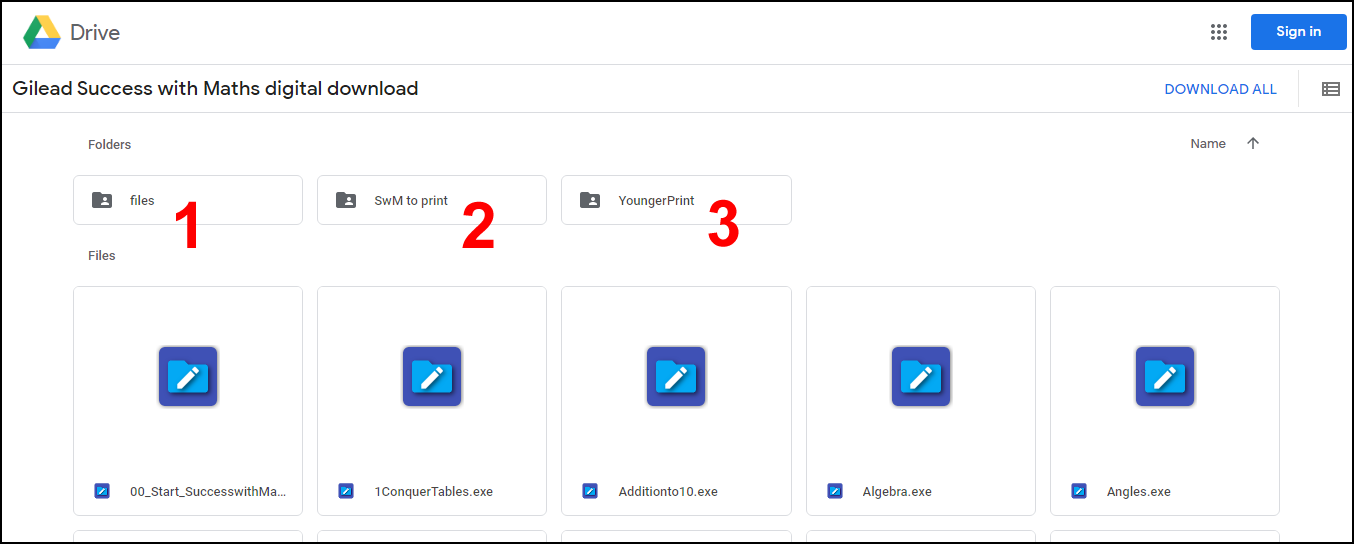
E.g. if an audio file does not play, look for it in the folder “files” (1); if a pdf file is missing, look for it the folder “SwM to print” (2) or “YoungerPrint” (3):
____________________________________________________________________